
ISSN:
2181-3906
2024
International scientific journal
«MODERN SCIENCE АND RESEARCH»
VOLUME 3 / ISSUE 3 / UIF:8.2 / MODERNSCIENCE.UZ
409
TRANSACTION. TRANSACTION MANAGEMENT. TCL SECTION COMMANDS.
Ochilboyev Umidjon Ilxom o‘g‘li
Shamuratov Ulug‘bek Alisher Uli
Abduxalilboyev Alisher Abdug‘ani o‘g‘li
In the name of Muhammad al-Khorazmi,
Students of Tashkent University of Information Technologies.
https://doi.org/10.5281/zenodo.10825940
Abstract.
This article first introduces the concept of transactions and clearly explains
about its commands. It clearly states when and under what conditions transaction orders are used.
Also shown is the syntax of transaction commands. The differences between the commands are
clearly highlighted.
Keywords:
Transaction,
DDL, DML, DQL, DCL, TCL, COMMIT, ROLLBACK and
SAVEPOINT.
СДЕЛКА. УПРАВЛЕНИЕ ТРАНЗАКЦИЯМИ. КОМАНДЫ РАЗДЕЛА TCL.
Аннотация.
В этой статье впервые представлено понятие транзакций и подробно
объяснены их команды. В нем четко указано, когда и при каких условиях используются
ордера на транзакции. Также показан синтаксис команд транзакции.
Различия между командами четко выделены.
Ключевые слова:
транзакция, DDL, DML, DQL, DCL, TCL, COMMIT, ROLLBACK и
SAVEPOINT.
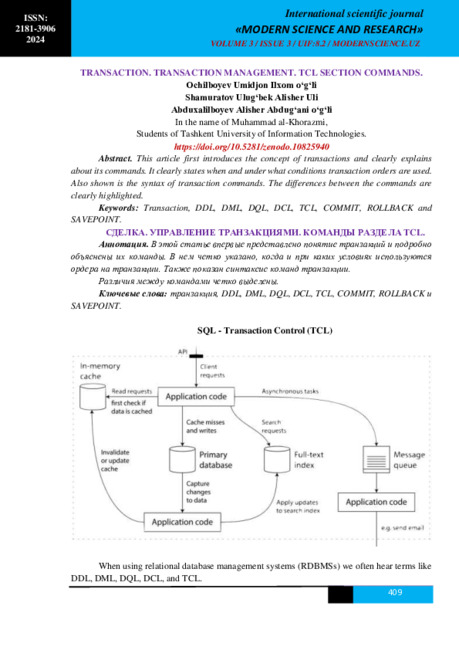
SQL - Transaction Control (TCL)
When using relational database management systems (RDBMSs) we often hear terms like
DDL, DML, DQL, DCL, and TCL.

ISSN:
2181-3906
2024
International scientific journal
«MODERN SCIENCE АND RESEARCH»
VOLUME 3 / ISSUE 3 / UIF:8.2 / MODERNSCIENCE.UZ
410
In the context of SQL, TCL stands for Transaction Control Language
.
In SQL, TCL means Transaction Control and is a set of commands that manage the
effectiveness of a DML action.
TCL is a subset of SQL. It’s just one of the various initialisms we can find in SQL. Others
include DDL (Data Definition Language), DML (Data Manipulation Language), DCL (Data
Control Language), and DQL (Data Query Language).
Transaction Control Language is a subset of SQL that’s used to manage transactions in a
relational database.
A transaction begins when the first executable SQL statement is encountered. An
executable SQL statement is a SQL statement that generates calls to a database instance, including
DML and DDL statements and the SET TRANSACTION statement.
When a transaction begins, Oracle Database assigns the transaction to an available undo
data segment to record the undo entries for the new transaction. A transaction ID is not allocated
until an undo segment and transaction table slot are allocated, which occurs during the first DML
statement.
TCL commands are important for maintaining the consistency, integrity, and reliability of
the database in the event of errors or failures during transactions.
A transaction ID is unique to a transaction and represents the:
undo segment number,
slot,
and sequence number.
Transaction control involves using the following statements:
The COMMIT statement ends the current transaction and makes all changes performed in
the transaction permanent. COMMIT also erases all savepoints in the transaction and releases
transaction locks.
The ROLLBACK statement reverses the work done in the current transaction; it causes all
data changes since the last COMMIT or ROLLBACK to be discarded. The ROLLBACK TO
SAVEPOINT statement undoes the changes since the last savepoint but does not end the entire
transaction.
The SAVEPOINT statement identifies a point in a transaction to which you can later roll
back.
A commit ends the current transaction and makes permanent all changes performed in the
transaction.
1.
COMMIT
When a transaction commits, the following actions occur:
Purpose
Use the COMMIT statement to end your current transaction and make permanent all
changes performed in the transaction. A transaction is a sequence of SQL statements that Oracle
Database treats as a single unit. This statement also erases all savepoints in the transaction and
releases transaction locks.
Until you commit a transaction:

ISSN:
2181-3906
2024
International scientific journal
«MODERN SCIENCE АND RESEARCH»
VOLUME 3 / ISSUE 3 / UIF:8.2 / MODERNSCIENCE.UZ
411
You can see any changes you have made during the transaction by querying the modified
tables, but other users cannot see the changes. After you commit the transaction, the changes are
visible to other users' statements that execute after the commit.
You can roll back (undo) any changes made during the transaction with the ROLLBACK
statement (see ROLLBACK).
Oracle Database issues an implicit COMMIT under the following circumstances:
Before any syntactically valid data definition language (DDL) statement, even if the
statement results in an error
After any data definition language (DDL) statement that completes without an error
You can also use this statement to:
Commit an in-doubt distributed transaction manually.
Terminate a read-only transaction begun by a SET TRANSACTION statement.
Oracle recommends that you explicitly end every transaction in your application programs
with a COMMIT or ROLLBACK statement, including the last transaction, before disconnecting
from Oracle Database. If you do not explicitly commit the transaction and the program terminates
abnormally, then the last uncommitted transaction is automatically rolled back.
A normal exit from most Oracle utilities and tools causes the current transaction to be
committed. A normal exit from an Oracle precompiler program does not commit the transaction
and relies on Oracle Database to roll back the current transaction.
Prerequisites
You need no privileges to commit your current transaction.
To manually commit a distributed in-doubt transaction that you originally committed, you
must have FORCE TRANSACTION system privilege. To manually commit a distributed in-doubt
transaction that was originally committed by another user, you must have FORCE ANY
TRANSACTION system privilege.
Syntax
commit
::=
COMMIT
All clauses after the COMMIT keyword are optional. If you specify only COMMIT, then
the default is COMMIT WORK WRITE WAIT IMMEDIATE.
The WORK keyword is supported for compliance with standard SQL. The statements
COMMIT and COMMIT WORK are equivalent.

ISSN:
2181-3906
2024
International scientific journal
«MODERN SCIENCE АND RESEARCH»
VOLUME 3 / ISSUE 3 / UIF:8.2 / MODERNSCIENCE.UZ
412
This clause is supported for backward compatibility. Oracle recommends that you use
named transactions instead of commit comments.
Usage syntax:
This statement inserts a row into the hr.regions table and commits this change:
INSERT INTO regions VALUES (5, 'Antarctica');
COMMIT WORK;
Commenting on COMMIT: Example
The following statement commits the current transaction and associates a comment with it:
COMMIT
COMMENT 'In-doubt transaction Code 36, Call (415) 555-2637';
ROLLBACK
Purpose
Use the ROLLBACK statement to undo work done in the current transaction or to manually
undo the work done by an in-doubt distributed transaction.
Oracle recommends that you explicitly end transactions in application programs using
either a COMMIT or ROLLBACK statement. If you do not explicitly commit the transaction and
the program terminates abnormally, then Oracle Database rolls back the last uncommitted
transaction.
Prerequisites
To roll back your current transaction, no privileges are necessary.
To manually roll back an in-doubt distributed transaction that you originally committed,
you must have the FORCE TRANSACTION system privilege. To manually roll back an in-doubt
distributed transaction originally committed by another user, you must have the FORCE ANY
TRANSACTION system privilege.
Syntax
rollback
::=
TO SAVEPOINT Clause
Specify the savepoint to which you want to roll back the current transaction. If you omit
this clause, ten the ROLLBACK statement rolls back the entire transaction.
Using ROLLBACK without the TO SAVEPOINT clause performs the following
operations:
Ends the transaction
Undoes all changes in the current transaction
Erases all savepoints in the transaction
Releases any transaction locks.
Rolling Back Transactions: Examples
The following statement rolls back your entire current transaction:

ISSN:
2181-3906
2024
International scientific journal
«MODERN SCIENCE АND RESEARCH»
VOLUME 3 / ISSUE 3 / UIF:8.2 / MODERNSCIENCE.UZ
413
ROLLBACK;
The following statement rolls back your current transaction to savepoint banda_sal:
ROLLBACK TO SAVEPOINT banda_sal;
The following statement manually rolls back an in-doubt distributed transaction:
ROLLBACK WORK
FORCE '25.32.87';
2.
SAVEPOINT
Purpose
Use the SAVEPOINT statement to create a name for a system change number (SCN),
to which you can later roll back.
• Oracle Database Concepts for information on savepoints.
• ROLLBACK for information on rolling back transactions
• SET TRANSACTION for information on setting characteristics of the current
transaction
• Syntax
• savepoint::=
savepoint
Specify the name of the savepoint to be created.
Savepoint names must be distinct within a given transaction. If you create a second
savepoint with the same identifier as an earlier savepoint, then the earlier savepoint is erased. After
a savepoint has been created, you can either continue processing, commit your work, roll back the
entire transaction, or roll back to the savepoint.
Creating Savepoints: Example
To update the salary for Banda and Greene in the sample table hr.employees, check that
the total department salary does not exceed 314,000, then reenter the salary for Greene:
UPDATE employees
SET salary = 7000
WHERE last_name = 'Banda';
SAVEPOINT banda_sal;
UPDATE employees
SET salary = 12000
WHERE last_name = 'Greene';
SAVEPOINT greene_sal;
SELECT SUM(salary) FROM employees;
ROLLBACK TO SAVEPOINT banda_sal;
UPDATE employees
SET salary = 11000
WHERE last_name = 'Greene';
COMMIT;
Difference between Commit, rollback and savepoint of TCL commands

ISSN:
2181-3906
2024
International scientific journal
«MODERN SCIENCE АND RESEARCH»
VOLUME 3 / ISSUE 3 / UIF:8.2 / MODERNSCIENCE.UZ
414
Sno.
Rollback
Commit
Savepoint
1
Rollback means the
database is restored to the
last committed state
DML commands saves
modification and it
permanently saves the
transaction.
Savepoint helps to save
the transaction
temporarily.
2
Syntax- ROLLBACK [To
SAVEPOINT_NAME];
Syntax- COMMIT;
Syntax- SAVEPOINT
[savepoint_name;]
3
Example- ROLLBACK
Update5;
Example- SQL>
COMMIT;
Example-
SAVEPOINT
table_create;
In summary, the above definition for TCL is one of many possible definitions.TCL is a
simple initialism, and it could mean many different things, depending on the context it is being
used. Even in the relatively specific field of software, TCL has many potential definitions. Here
are some common ones:
TCl (pronounced “tickle” or as an initialism) can be an initialism for Tool Command
Language, a scripting language commonly used for creating and controlling various software
applications.
TCL can also refer to Terminal Control Language, used to program Verifone devices.
TCL can refer to Tiny Core Linux, a minimal Linux operating system.
TCL can refer to Tymshare Conversational Language, a former experimental interactive
language.
TCL can also be used in the context of Think Class Library, a class library for Macintosh
featured in think.
REFERENCES
1.
Patrick O’Neil and Elizabeth O’Neil, Database Principles, Programming and
Performance, Harcourt Asia Pte. Ltd., First Edition, 2001.
2.
Peter Rob and Carlos Coronel, Database Systems Design, Implementation and
Management, Thomson Learning-Course Technology, Seventh Edition, 2007.
3.
C. J. Date, A. Kannan and S. Swamynathan, An Introduction to Database Systems,
Pearson Education, Eighth Edition, 2009.
4.
Abraham Silberschatz, Henry F. Korth and S. Sudarshan, Database System Concepts,
McGraw-Hill Education (Asia), Fifth Edition, 2006.
5.
Atul Kahate, Introduction to Database Management Systems, First Edition, 2006.